How to Format ATS Resume (2026 Edition)

BlogsHow to Format ATS Resume (2026 Edition)

Why Resume Design Matters in the ATS Era?

In todayʼs digital hiring process, your resume is more than a summary itʼs your first test.

Before it reaches a recruiter, it needs to pass an Applicant Tracking System (ATS). These systems donʼt just check your experience they scan your resume for formatting, keywords, and relevance.

Even a resume packed with experience can get filtered out if it's not ATS-friendly. Thatʼs why designing for both machines and humans is the new standard.

Evolution of hiring

💡3 Key Takeaway

  • Strategic keyword placement matters more than keyword volume context is key.
  • Poor formatting (like tables, images, or incorrect file types) can block ATS readability.
  • Tailoring each resume to the specific job description is essential not optional.

Essential Elements Of An ATS-Optimized Resume

To increase your chances of making it past the digital filter, make sure your resume includes:

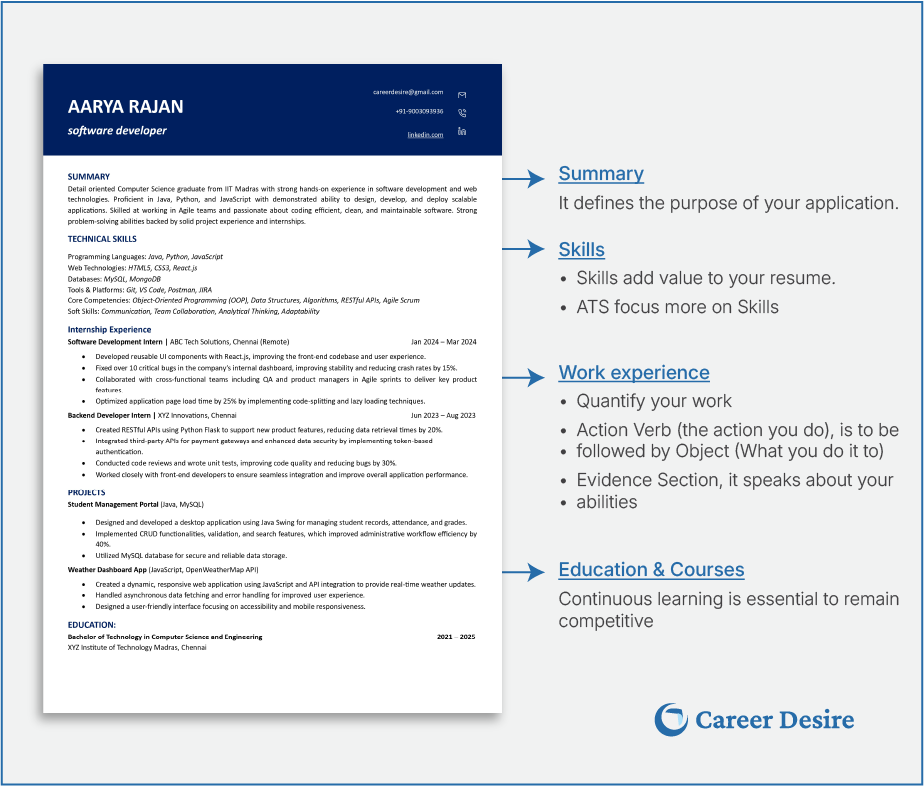
• Strategic Keywords – Match the exact terms used in the job posting: skills, certifications, tools, etc.

• Standard Section Headings – Use terms like Work Experience, Education, and Skills.

• Consistent Formatting – Stick to clean layouts, readable fonts, and clear bullet points.

• No Fancy Elements – ATS tools canʼt process images, icons, tables, or columns effectively.

A clean, well-organized resume with the right content ensures nothing important gets missed.

Balancing Creativity With ATS Compliance

You donʼt have to sacrifice visual appeal completely but you do need to be smart about it.

Smart design tips:

• Use light, professional colours if appropriate for your industry

• Underline or bold headings for clarity (use sparingly)

• Stick to a single column

• Use bullet points for achievements

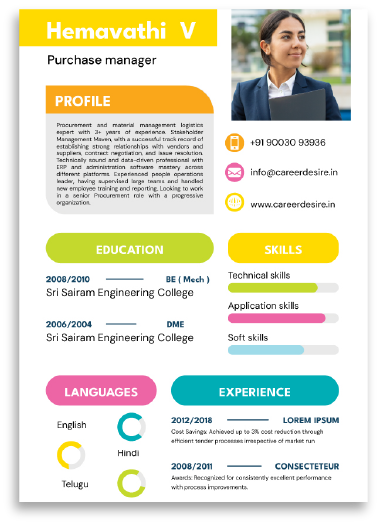
• Avoid graphics, charts, or infographics they may confuse ATS software

ATS-Blocking

Evolution of hiring

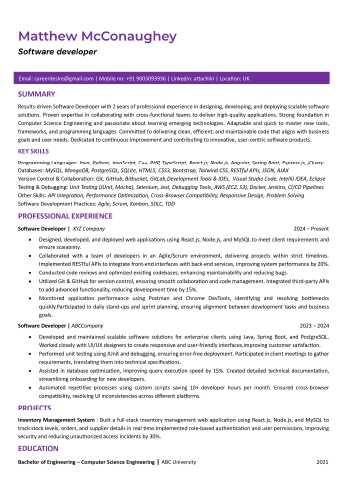
ATS-Friendly

Evolution of hiring

Customizing Your Resume For Every Role

No two job descriptions are alike and your resume shouldnʼt be either.

• Hereʼs how to personalize effectively:

• Mirror the language used in the job ad

• Rearrange sections based on the jobʼs priorities

• Update your summary each time donʼt use a generic version

• Focus on relevance highlight the skills they care about most

Customization boosts both your match score and your callback chances.

Evolution of hiring

Overcoming ATS Formatting Challenges

Avoid common mistakes that can trip up even a strong resume:

• File Format: Always submit in the requested format, .docx and .pdf are typically safe (if allowed).

• Layout: Stick to a top-down, single-column structure.

• Fonts: Use ATS-safe fonts like Arial, Calibri, or Times New Roman.

• Avoid headers, footers, and anything fancy that might interfere with parsing.

Avoid these mistakes: wrong file type, multi-column layouts, decorative fonts, or hidden contact info in headers/footers. Small errors can derail your chances.

DOs and DON'Ts of ATS resume

DOsDONʼTs
File Type: docx or .pdf (as per job posting)File Type: Uploading a .jpg, .png, or unrequested .pdf
Font: Use standard fonts like Arial, Calibri, or Times New Roman, size 10–12 ptFont: Using decorative or hard-to-read fonts like Comic Sans, Papyrus, or cursive styles
Layout: Simple, top-to-bottom structure without multiple columnsLayout: Using columns, grids, or text boxes that confuse ATS parsing
Sections: Use clear headings like Experience, Education, SkillsSections: Headings like “My Journeyˮ instead of “Experienceˮ
Bullet Points: Use simple bullets (•) to list accomplishmentsBullet Points: Using emojis or special characters as bullets
No Graphics: Avoid logos, headshots, or iconsGraphics & Photos: Adding your photo, icons, or logos (ATS canʼt process these)
Simple Contact Info: Plain text email and phone number, not in headers or footersContact Info in Header/Footer: Placing your email or phone number inside a header ATS might miss it
No Tables or Text Boxes: All text should be directly readable in the body of the resumeHeavy Use of Tables: Tables for layout or skills sections can break parsing logic

Case Studies: What An ATS-Friendly Resume Looks Like

Case Study 1: Software Engineer Resume

• Uses a single-column layout with clean headings

• Includes keywords like “JavaScript,ˮ “API Integration,ˮ and “Reactˮ naturally

• Action-driven bullets: “Reduced load time by 38% through code optimizationˮ

• ATS-friendly formatting with zero graphics

Case Study 2: Product Marketing Resume

• Fully aligned with job description wording

• Measurable results featured: “Increased lead conversion by 21%ˮ

• Clear, bolded sections and clean bullet structure

• Subtle design touches that enhance without disrupting ATS compatibility

From software engineers to marketers, ATS-friendly resumes share one thing: clean design, relevant keywords, measurable results.

💡Advanced Pro Tips

  • Add a Core Competencies section to surface critical skills fast
  • Use alternate job titles subtly to match broader keyword searches
  • Reorder sections to spotlight your most relevant experience
  • Keep your LinkedIn profile aligned with your resumeʼs keywords
  • Always write in active, impact-focused language

Final Thoughts

ATS systems arenʼt going away theyʼre evolving. To stand out, your resume must check both the technical and human boxes. Your resume isnʼt just a document itʼs your first impression. Make it count.

Remember:

• Format clearly

• Prioritize strategic keyword use

• Tailor your resume for every role

• Avoid formatting mistakes that kill your chances

Conclusion

Designing a resume that performs well with ATS and still appeals to recruiters is no longer optional itʼs essential. Every formatting choice, keyword, and section header can impact your visibility.

If you want to be sure your resume makes the cut: